One platform.
Complete factory control.
From the first inquiry to the last cut part — automated, connected, visible.
One platform for every step of production.
Most cutting operations run on a patchwork of tools — a separate ERP, a standalone CAD/CAM, paper job tickets, and manual reporting. OmniFab replaces that patchwork with one connected system, built specifically for thermal cutting.
- Connects ERP, CAD/CAM, shop floor, and machines in one system
- Automates the entire flow — from quoting to machine job release
- Real-time visibility across every order, machine, and material
- Built for thermal cutting — not a generic MES adapted for the shop floor

End-to-end control of your cutting operation
OmniFab connects every step — from quote to delivery — in one integrated system.
ERP Connect — No More Double Entry
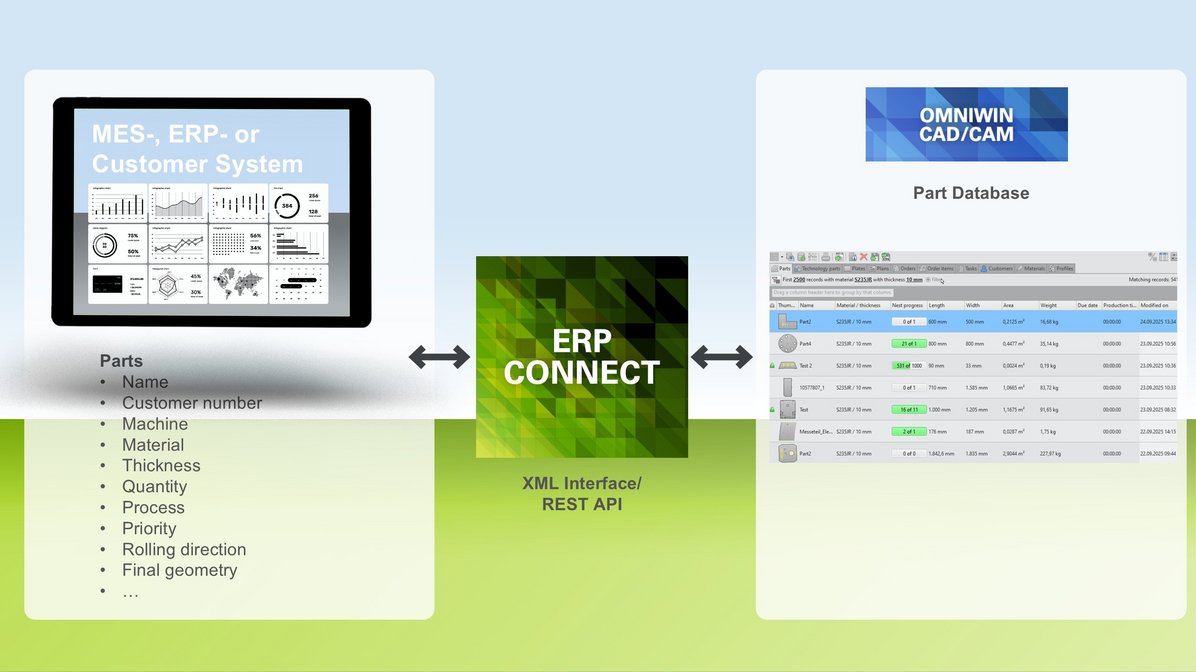
OmniFab talks directly to your ERP system. Orders, delivery dates, and customer data flow in automatically — and finished job results flow back out. Eliminate manual re-entry between systems and make your data the single source of truth across the entire value chain.
- Bidirectional data exchange — orders in, results out
- Numerous ERP systems already connected — custom interfaces implementable on request
- Consistent data across sales, planning, and production
Learn more Show less
XML & REST API
Data is exchanged via XML files or a REST API; cloud ERP systems and database links are possible too. Runs entirely in the background.
Orders
Released in the ERP, they appear in the nesting software straight away — order items with geometry, material and quantity created in seconds.
Plate inventory
Plate stock from the ERP in real time, plates reserved directly from the ERP. Remnants go back with weight, size and geometry.
Customer data
Customer master data comes straight from the ERP into OmniWin.
Parts
Individually or in batches with exact geometry into the OmniWin part database — or as standard templates such as rectangle, circle, ring or trapezoid.
Feedback
Nesting plan data or, with PDC, actual production data — times, plates used, defective parts — flows back into the ERP.
Order Management & Automated Quoting
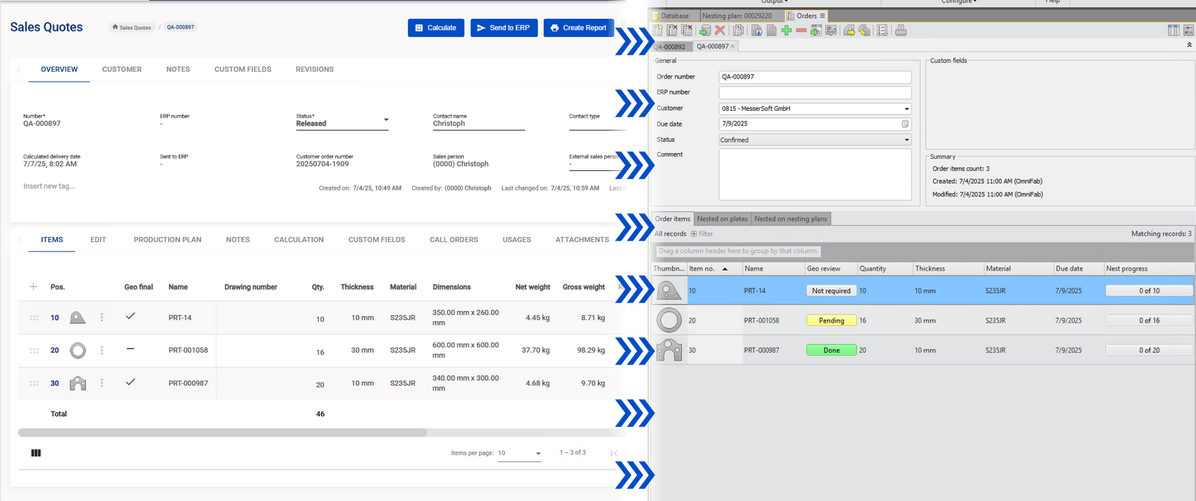
Stop losing time on manual calculations. OmniFab reads customer files, calculates material, cutting times, and costs automatically — and compares different production scenarios so you always quote accurately and win more business with less effort.
- Production times, material, and costs calculated automatically
- Scenario comparison — laser vs. plasma, plate formats, multi-torch
- Direct transfer to OmniWin — no re-entry, no data loss
Learn more Show less
Parts & work steps
Record existing and new parts in the quote, with work steps, production parameters and working papers.
Pre-nesting
Nesting runs automatically during quote calculation — no CAD/CAM expertise needed.
Scenario comparison
Cutting speeds, cost rates, material, scrap, plates and total cost — on one or several machines. The cheapest scenario is found automatically.
Master data & status
Import materials and customers, track quote status in real time and pass quotes on to the ERP.
Versions
Every change documented, marked quotes found in no time.
Job Management — The Right Job on the Right Machine
Replace paper job tickets with a digital workflow that routes every production order automatically. Each machine operator sees exactly what to run next — and as jobs complete, status updates flow back to planning in real time.
- Paperless job routing — orders reach the machine automatically
- Live status per job — know exactly what is running where
- Tightly integrated with APS, Material Flow, and PDC
Learn more Show less
No working papers
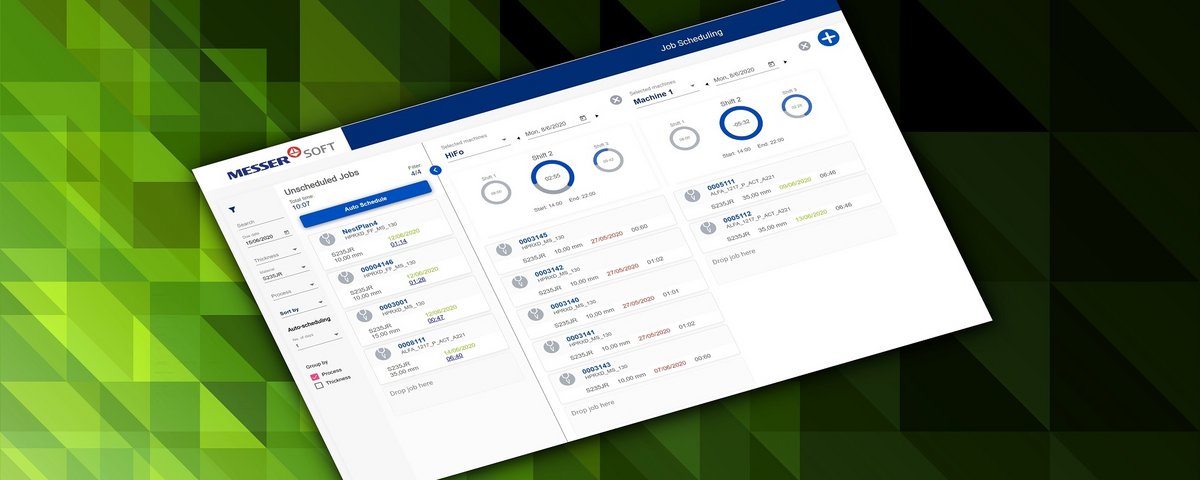
Jobs reach the right machine at the right time, with all nesting information in the digital job.
Filter & sort
By urgency, material and other attributes.
Manual or automatic
Schedule jobs on your machines by hand or let OmniFab do it.
Shift utilisation
Planned production time and current shift utilisation of every machine at a glance.
Advanced Planning & Scheduling (APS)
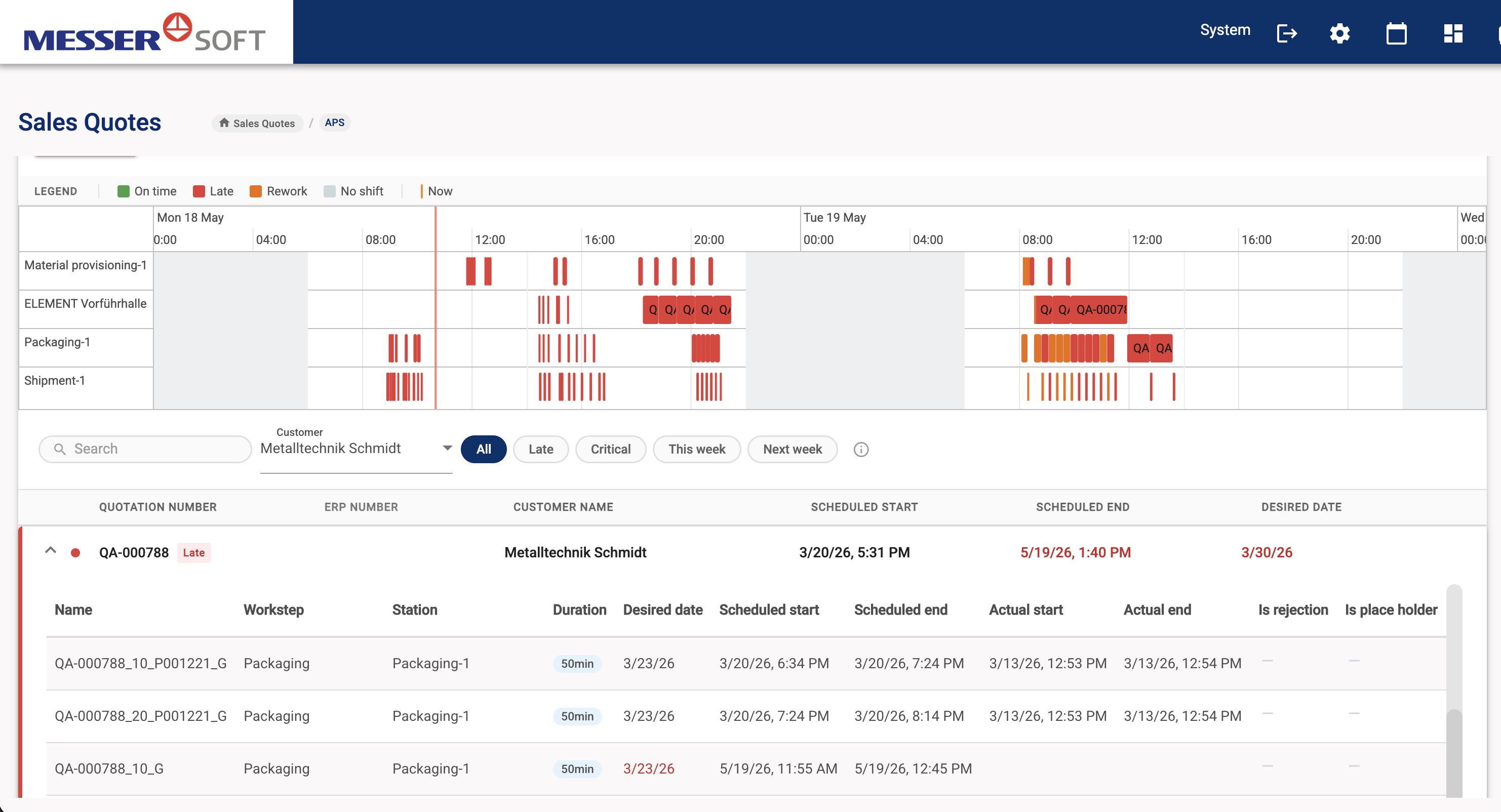
Know what's actually feasible — and stop firefighting. APS gives you precise capacity planning across all machines, with live feedback from the shop floor so you catch plan deviations early and react before they become problems.
- Precise capacity and resource planning across all machines
- Early detection of plan deviations through real-time production feedback
- Seamless data exchange with OmniWin and your ERP system
Learn more Show less
Data from Sales Quotes
Uses the quotation data directly, so planning is realistic from the start.
Flexible when plans change
Changing requirements are taken into account continuously, avoiding downtime and delays.
Drawings at the machine
Operators get all planning information and documents such as technical drawings digitally.
Feedback to the ERP
Progress and changes are reported back digitally — into your ERP if you wish.
PDC — Real Production Data, Not Guesswork
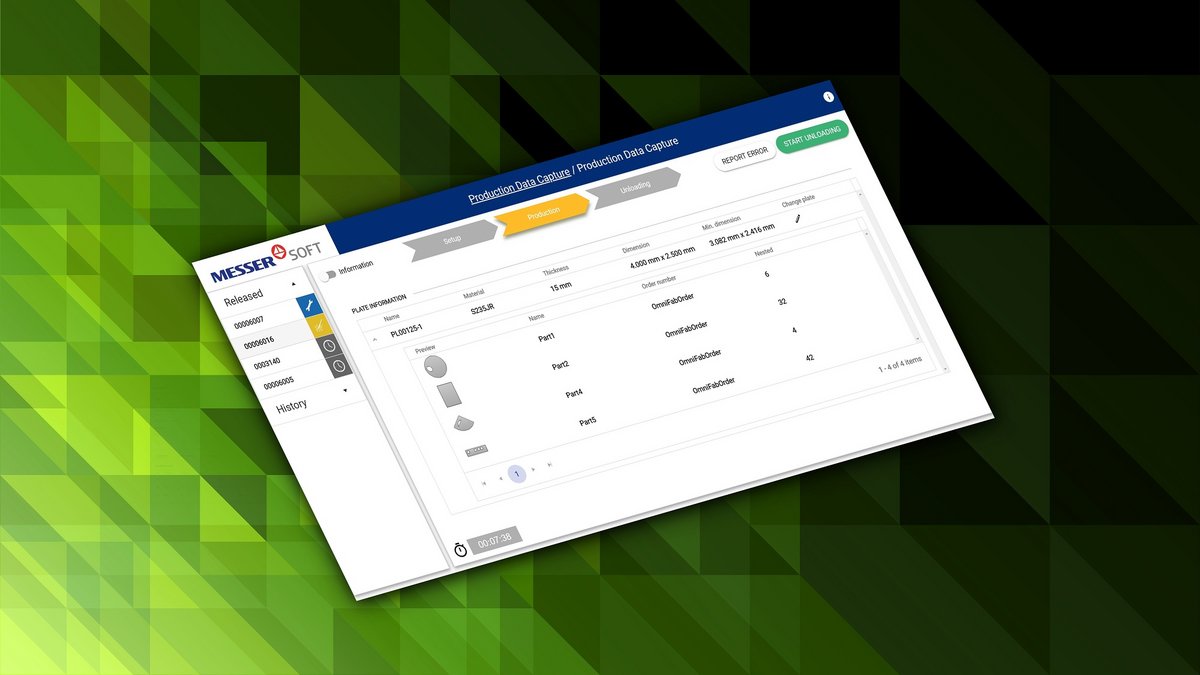
Give operators a simple tablet or smartphone interface to confirm job progress directly from the shop floor. Every confirmation feeds live data back to planning — so your schedule is always based on what is actually happening, not on what was planned.
- Tablet and smartphone interface for shop floor confirmations
- Actual quantities and times captured — no manual logging
- Feeds directly into APS replanning
Learn more Show less
Complete capture
Setup, production, loading and unloading times, parts and scrap, the plate actually used and the real material usage.
Report problems instantly
Missing material or consumables, or an error in the nesting plan, goes straight to planning — which can reschedule or re-nest at once.
Production Data Review
A web view of all reported data for completed jobs, to check and correct the results.
Machine Insight — Know Where You're Losing Time
Real-time visibility into every connected machine. See what's running, what's idle, and why — with graphical utilization breakdowns and automatic reports that replace manual logging and guesswork.
- Real-time machine status with utilization and downtime breakdown
- Planned vs. actual comparison per job — spot deviations immediately
- Shift, daily, and weekly reports generated automatically
Learn more Show less
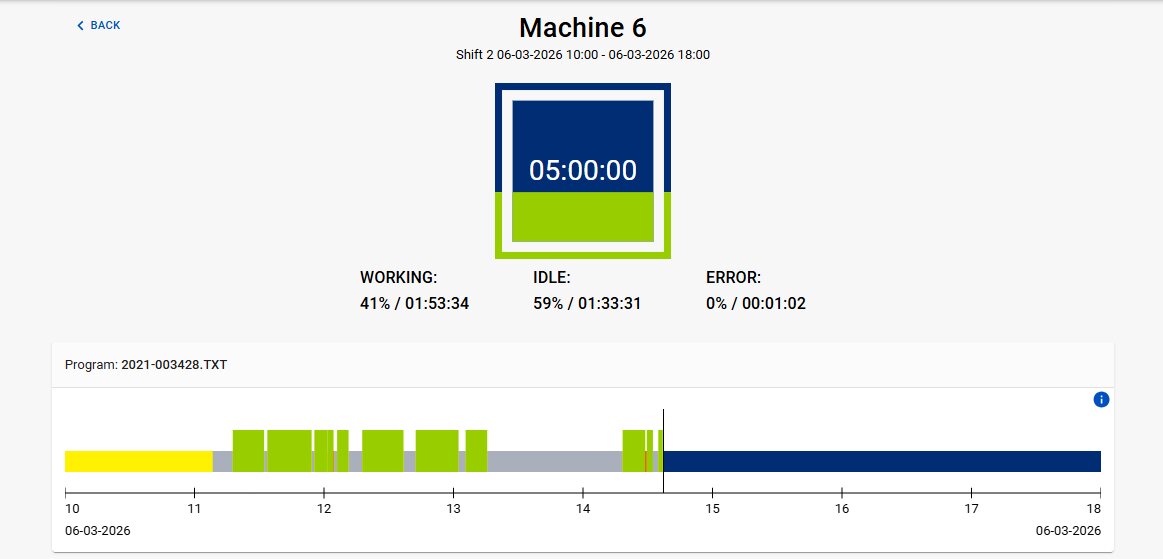
Live view
Current cutting program and shift, utilisation of the last shift, number and type of errors.
E-mail alerts
Automatic notification of error states — production reports by e-mail as well.
Time analyses
Working, idle and error time by day, week or month, filterable by shift, as chart or table, with CSV export.
Cutting job analysis
Every cutting job with times, processes and plate data — find the largest gaps between planned and actual time.
PDF reports
Per shift, day, week, four weeks and location — utilisation, downtimes and their causes, most frequent errors.
Material Flow Orchestration
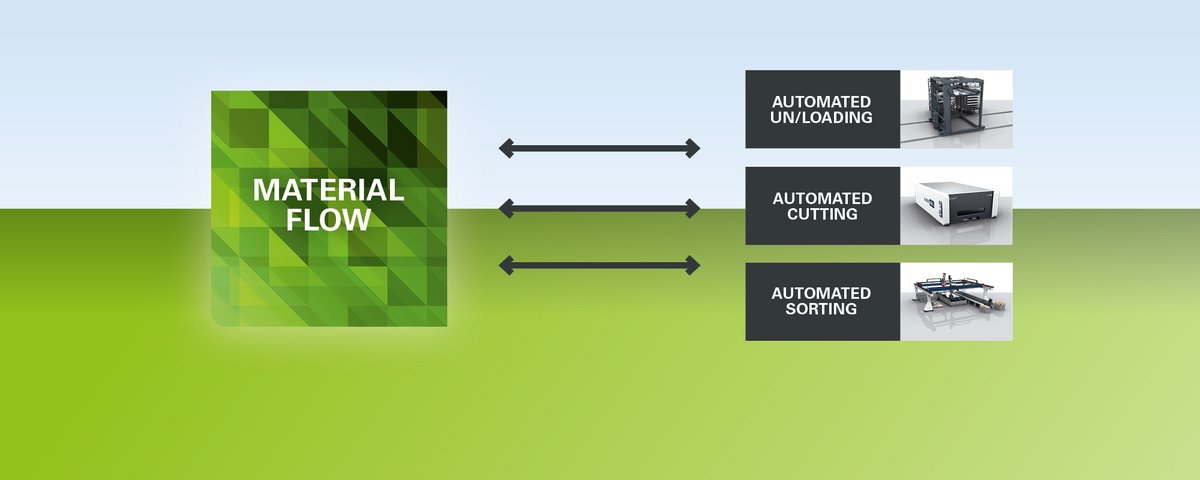
Let OmniFab handle the logistics. The Material Flow module connects loading stations, storage towers, and transport devices — and starts jobs automatically based on the production schedule. Your machines get what they need, when they need it, without anyone having to intervene manually.
- Automatic coordination of loading stations, towers, and transport
- Jobs triggered automatically — no manual intervention required
- Fully integrated with Job Management and APS
Learn more Show less
Knows the schedule
Material Flow knows exactly which jobs are scheduled on which machine and when.
Loading station
Operators see the planned jobs with their plate information and pick the right plate.
Automatic transport
Material is optionally stored, then moved to the cutting machine and the unloading station — with pallets and lifters.
Starts on its own
Jobs are fully configured in advance, so the machine starts cutting by itself.
See it in action
Watch how OmniFab handles every phase of your production — from job arrival to machine output.
See OmniFab in your factory
Book a free 45-minute live demo and see how OmniFab fits your operation.
Book a free demo